I.
Part One
Gallery
Ten canonical diagrams. Reading order matches the architecture chapters.
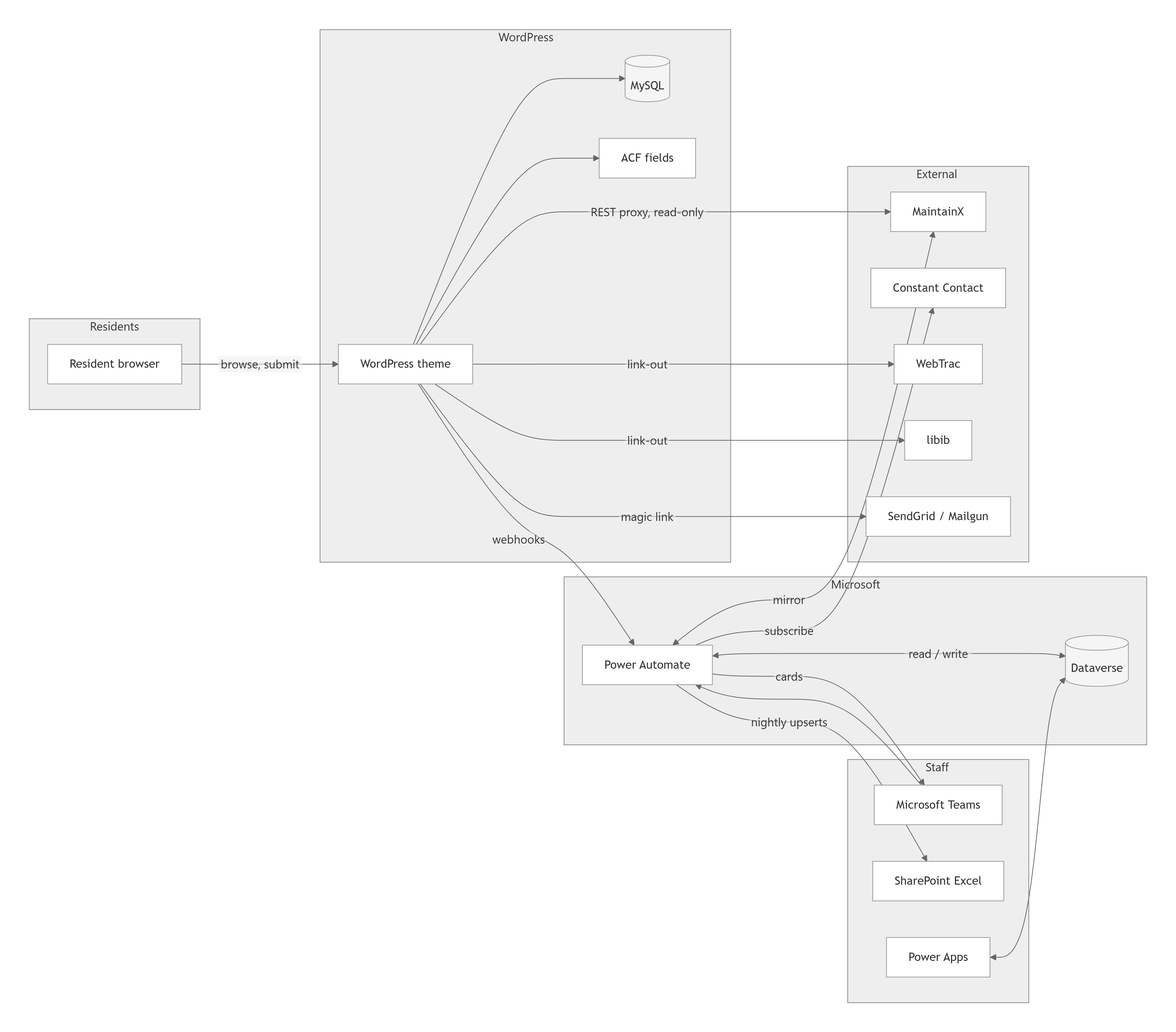
Mermaid source
flowchart LR
    subgraph Residents
        R[Resident browser]
    end

    subgraph Staff
        T[Microsoft Teams]
        SP[SharePoint Excel]
        PA[Power Apps]
    end

    subgraph WordPress
        WP[WordPress theme]
        MYSQL[(MySQL)]
        ACF[ACF fields]
    end

    subgraph Microsoft
        DV[(Dataverse)]
        FLOW[Power Automate]
    end

    subgraph External
        AUC[AUC / ADMINS]
        MX[MaintainX]
        CC[Constant Contact]
        WT[WebTrac]
        LIB[libib]
        SG[SendGrid / Mailgun]
    end

    AUC -->|CSV export| SPF[SharePoint watched folder]
    SPF --> FLOW
    R -->|browse, submit| WP
    WP --> MYSQL
    WP --> ACF
    WP -->|webhooks| FLOW
    FLOW <-->|read / write| DV
    FLOW -->|cards| T
    FLOW -->|nightly upserts| SP
    FLOW -->|subscribe| CC
    FLOW <-->|mirror| MX
    WP -->|REST proxy, read-only| MX
    WP -->|link-out| WT
    WP -->|link-out| LIB
    WP -->|magic link| SG
    PA <--> DV
    T --> FLOW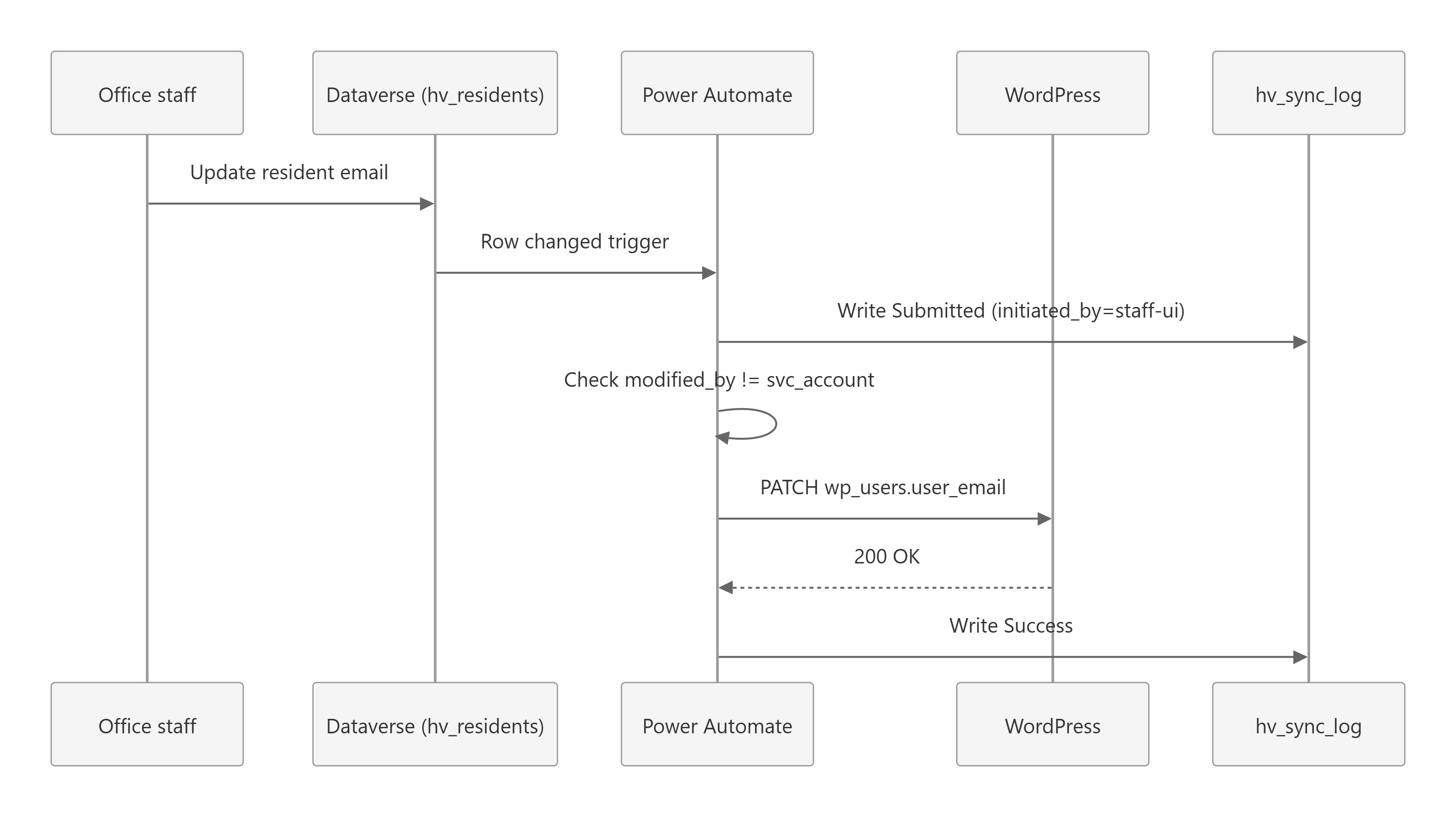
Mermaid source
sequenceDiagram
    participant Staff as Office staff
    participant DV as Dataverse (hv_residents)
    participant FLOW as Power Automate
    participant WP as WordPress
    participant LOG as hv_sync_log

    Staff->>DV: Update resident email
    DV->>FLOW: Row changed trigger
    FLOW->>LOG: Write Submitted (initiated_by=staff-ui)
    FLOW->>FLOW: Check modified_by != svc_account
    FLOW->>WP: PATCH wp_users.user_email
    WP-->>FLOW: 200 OK
    FLOW->>LOG: Write Success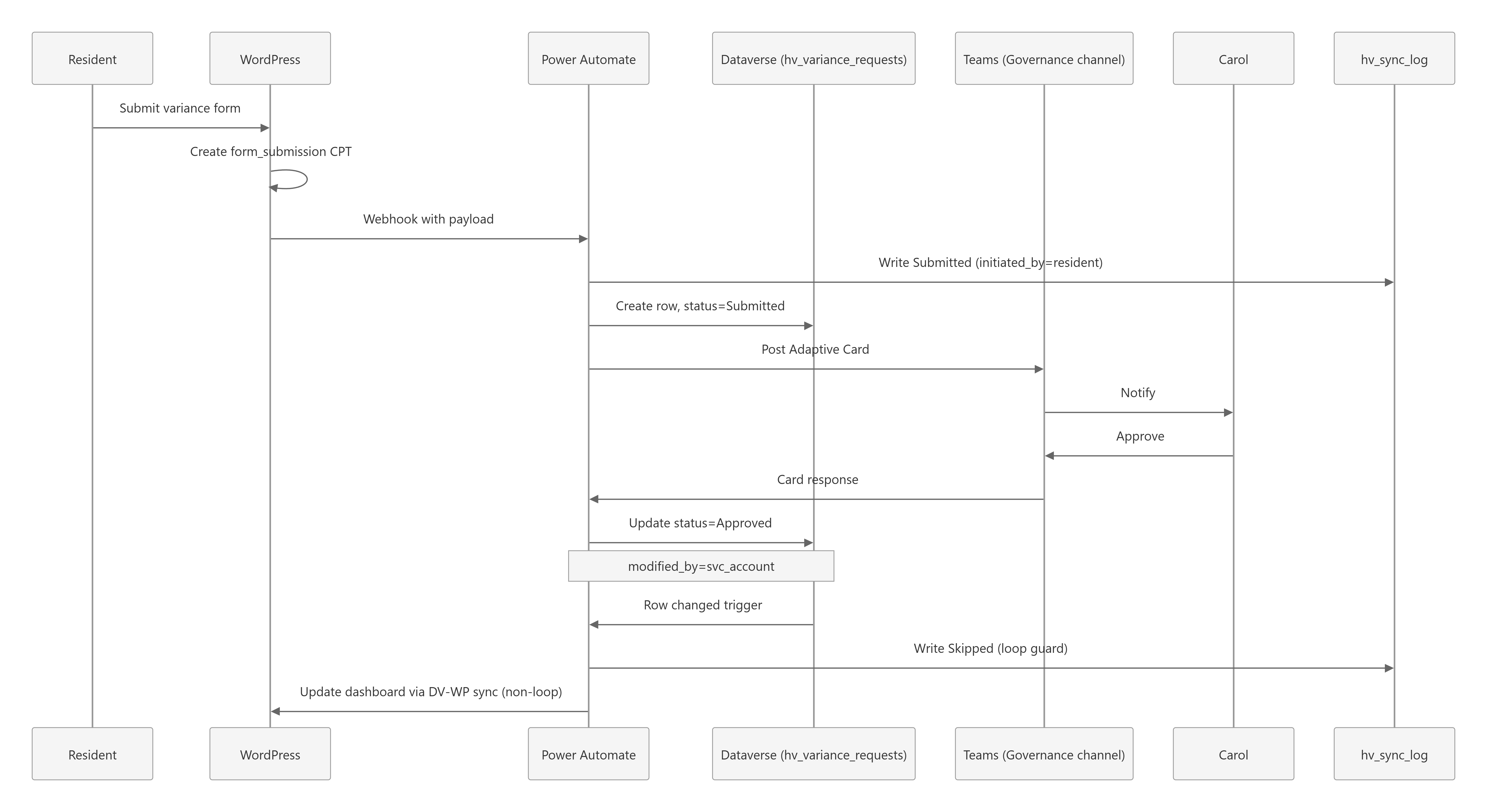
Mermaid source
sequenceDiagram
    participant Res as Resident
    participant WP as WordPress
    participant FLOW as Power Automate
    participant DV as Dataverse (hv_variance_requests)
    participant T as Teams (Governance channel)
    participant Carol as Carol
    participant LOG as hv_sync_log

    Res->>WP: Submit variance form
    WP->>WP: Create form_submission CPT
    WP->>FLOW: Webhook with payload
    FLOW->>LOG: Write Submitted (initiated_by=resident)
    FLOW->>DV: Create row, status=Submitted
    FLOW->>T: Post Adaptive Card
    T->>Carol: Notify
    Carol->>T: Approve
    T->>FLOW: Card response
    FLOW->>DV: Update status=Approved
    Note over FLOW,DV: modified_by=svc_account
    DV->>FLOW: Row changed trigger
    FLOW->>LOG: Write Skipped (loop guard)
    FLOW->>WP: Update dashboard via DV-WP sync (non-loop)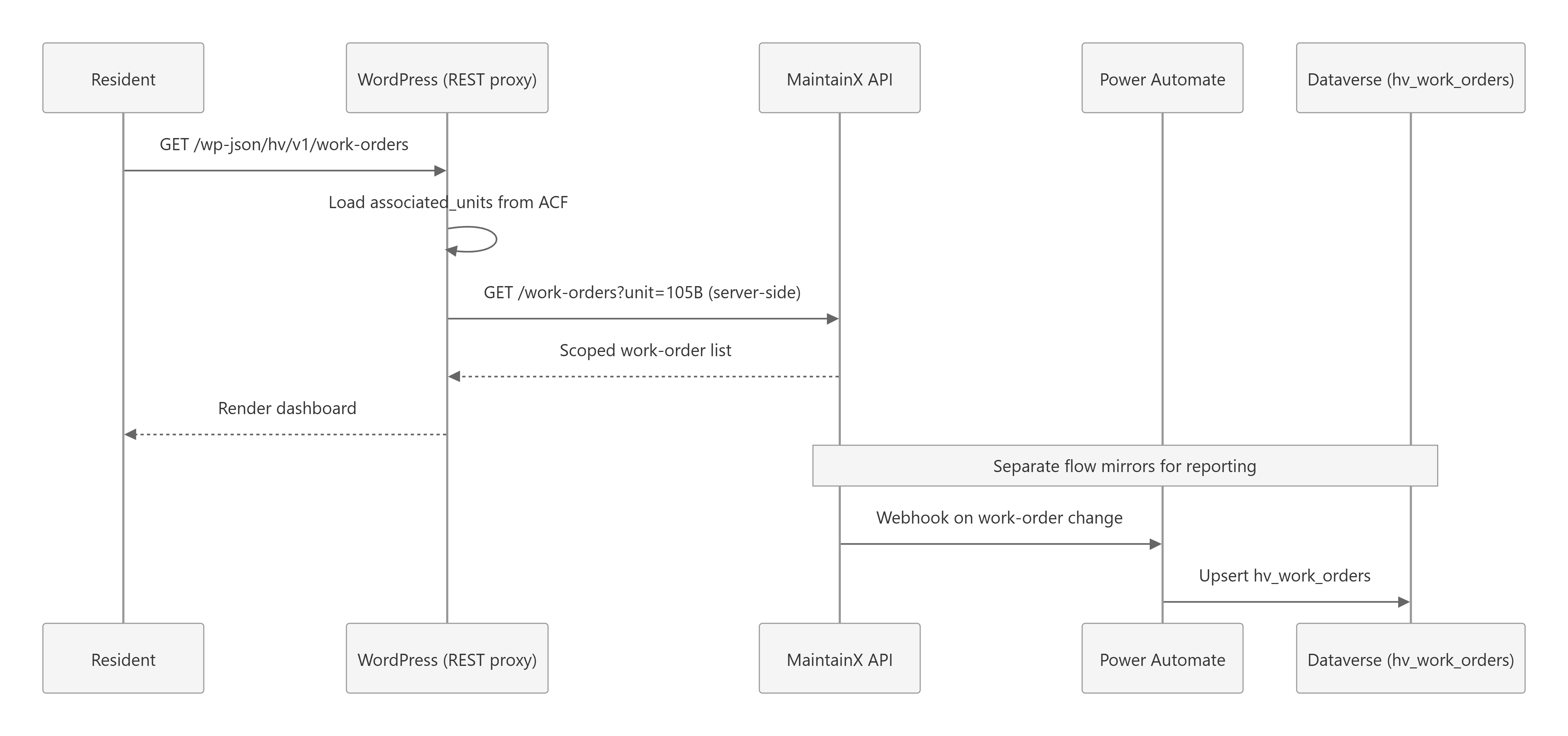
Mermaid source
sequenceDiagram
    participant Res as Resident
    participant WP as WordPress (REST proxy)
    participant MX as MaintainX API
    participant FLOW as Power Automate
    participant DV as Dataverse (hv_work_orders)

    Res->>WP: GET /wp-json/hv/v1/work-orders
    WP->>WP: Load associated_units from ACF
    WP->>MX: GET /work-orders?unit=105B (server-side)
    MX-->>WP: Scoped work-order list
    WP-->>Res: Render dashboard

    Note over MX,DV: Separate flow mirrors for reporting

    MX->>FLOW: Webhook on work-order change
    FLOW->>DV: Upsert hv_work_orders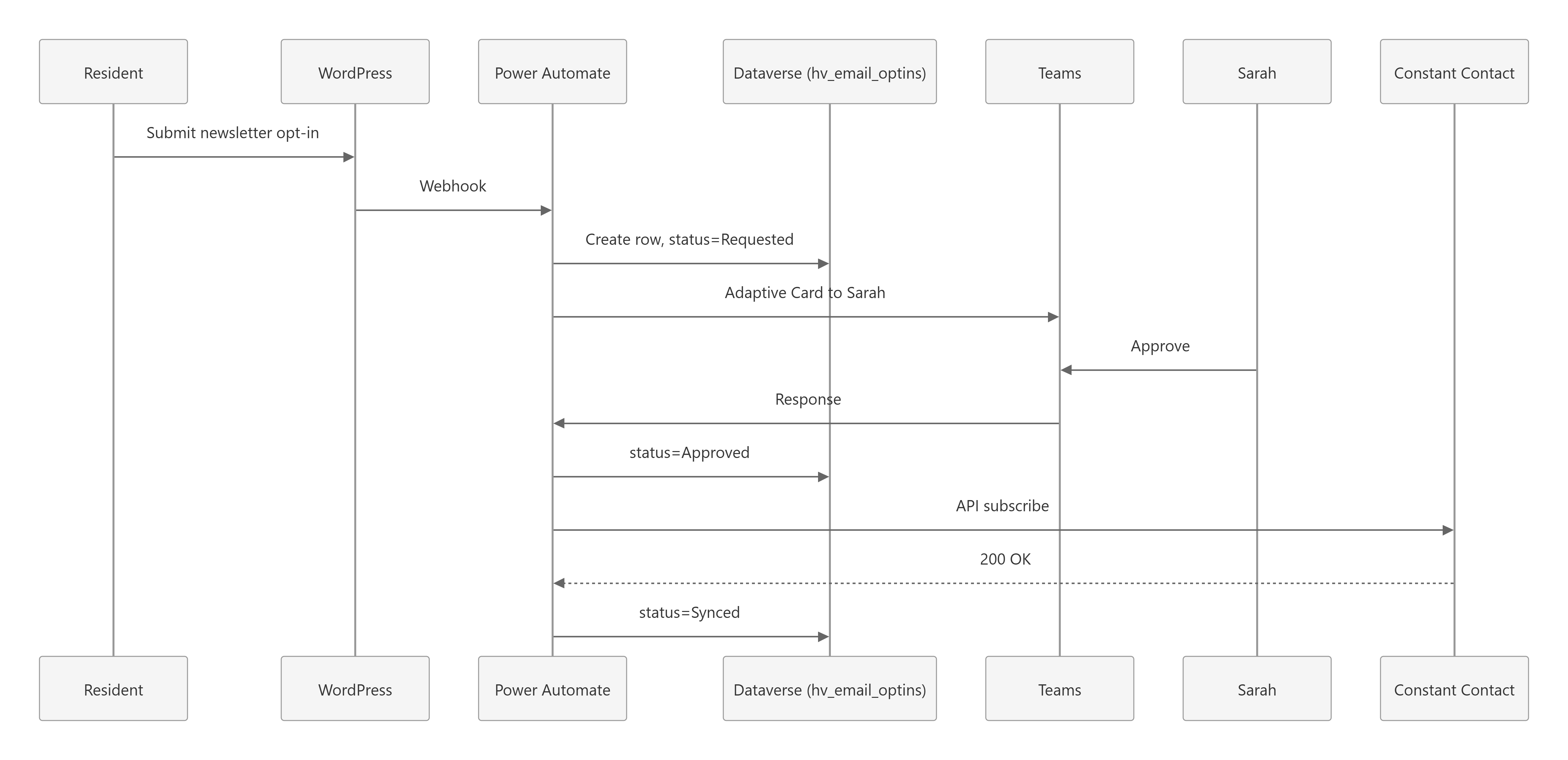
Mermaid source
sequenceDiagram
    participant Res as Resident
    participant WP as WordPress
    participant FLOW as Power Automate
    participant DV as Dataverse (hv_email_optins)
    participant T as Teams
    participant Sarah as Sarah
    participant CC as Constant Contact

    Res->>WP: Submit newsletter opt-in
    WP->>FLOW: Webhook
    FLOW->>DV: Create row, status=Requested
    FLOW->>T: Adaptive Card to Sarah
    Sarah->>T: Approve
    T->>FLOW: Response
    FLOW->>DV: status=Approved
    FLOW->>CC: API subscribe
    CC-->>FLOW: 200 OK
    FLOW->>DV: status=Synced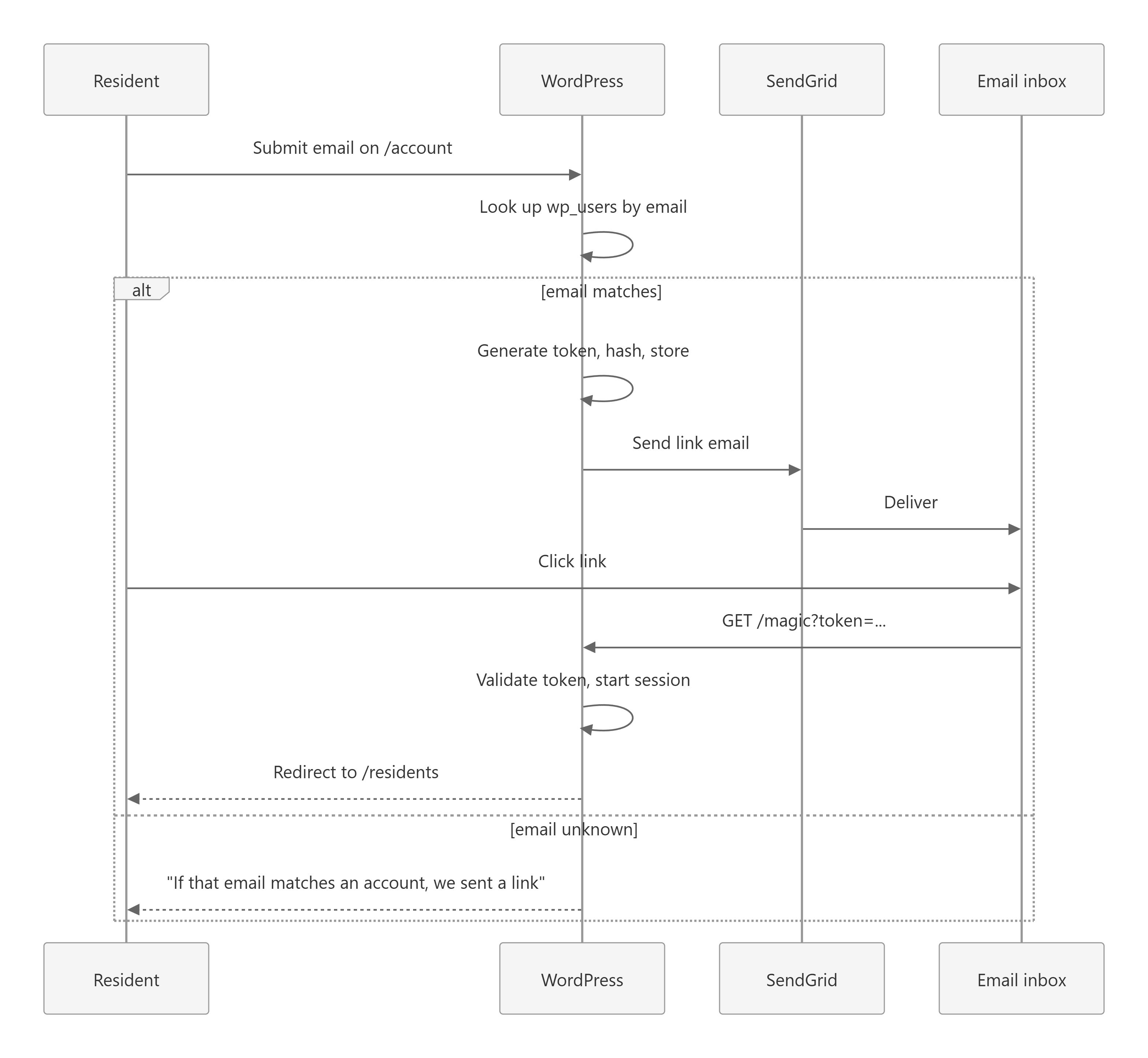
Mermaid source
sequenceDiagram
    participant Res as Resident
    participant WP as WordPress
    participant SG as SendGrid
    participant Mail as Email inbox

    Res->>WP: Submit email on /account
    WP->>WP: Look up wp_users by email
    alt email matches
        WP->>WP: Generate token, hash, store
        WP->>SG: Send link email
        SG->>Mail: Deliver
        Res->>Mail: Click link
        Mail->>WP: GET /magic?token=... (landing page, token not consumed)
        WP-->>Res: "Log me in" button
        Res->>WP: POST button click (consumes token)
        WP->>WP: Validate token, start session
        WP-->>Res: Redirect (same-site paths only) to /residents
    else email unknown
        WP-->>Res: "If that email matches an account, we sent a link"
    end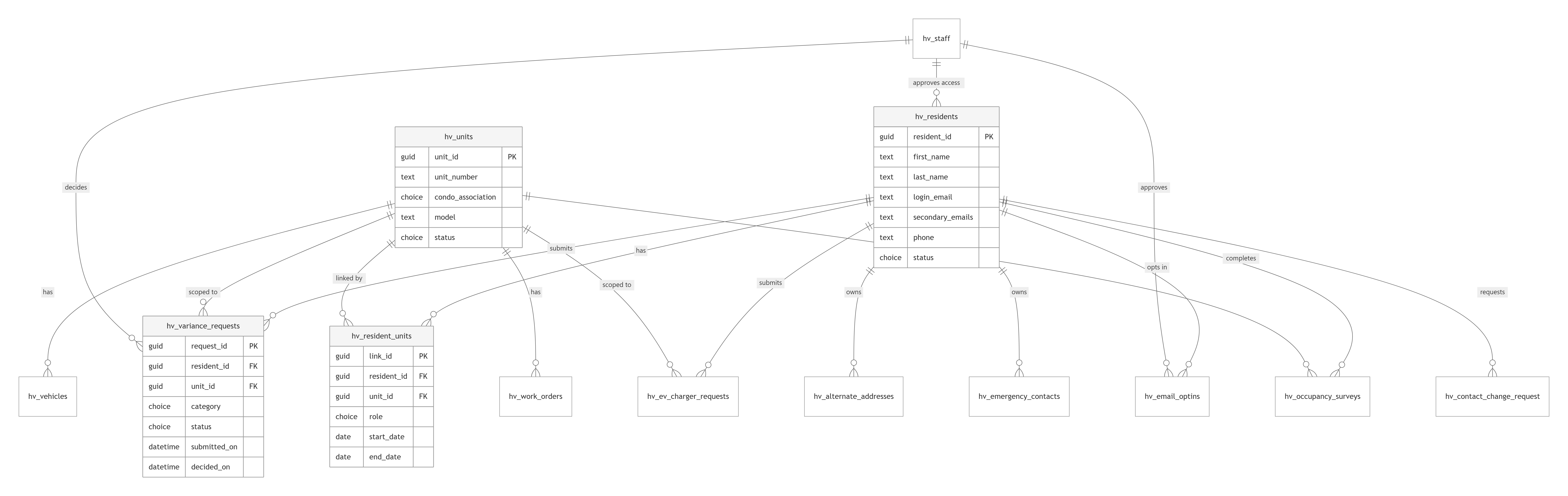
Mermaid source
erDiagram
    hv_residents ||--o{ hv_resident_units : "has"
    hv_units ||--o{ hv_resident_units : "linked by"
    hv_residents ||--o{ hv_alternate_addresses : "owns"
    hv_residents ||--o{ hv_emergency_contacts : "owns"
    hv_residents ||--o{ hv_variance_requests : "submits"
    hv_units ||--o{ hv_variance_requests : "scoped to"
    hv_residents ||--o{ hv_ev_charger_requests : "submits"
    hv_units ||--o{ hv_ev_charger_requests : "scoped to"
    hv_residents ||--o{ hv_email_optins : "opts in"
    hv_residents ||--o{ hv_contact_change_requests : "requests"
    hv_units ||--o{ hv_vehicles : "has"
    hv_units ||--o{ hv_work_orders : "has"
    hv_residents ||--o{ hv_occupancy_surveys : "completes"
    hv_units ||--o{ hv_occupancy_surveys : "reported for"
    hv_staff ||--o{ hv_variance_requests : "decides"
    hv_staff ||--o{ hv_email_optins : "approves"
    hv_staff ||--o{ hv_residents : "approves access"
Mermaid source
flowchart TD
    ROOT[Heritage Village staff]
    T1[Tier 1: Premium Power Apps + Dataverse]
    T2[Tier 2: Standard M365 + Teams Cards]
    T3[Tier 3: Standard M365 + Excel on SharePoint]

    PA[Power Automate Premium seats]

    ROOT --> T1
    ROOT --> T2
    ROOT --> T3
    ROOT --> PA

    T1 --> Nate[Nate: Procurement and Data Manager, sole builder]

    PA --> SVC[Sync service account]
    PA --> SEC[Security lead: standalone flows]

    T2 --> Carol[Carol: Governance liaison]
    T2 --> Sarah[Sarah: Communications]
    T2 --> Liaisons[Other approvers]

    T3 --> Ops[Ops staff]
    T3 --> Library[Library volunteers]
    T3 --> Readers[Read-only viewers]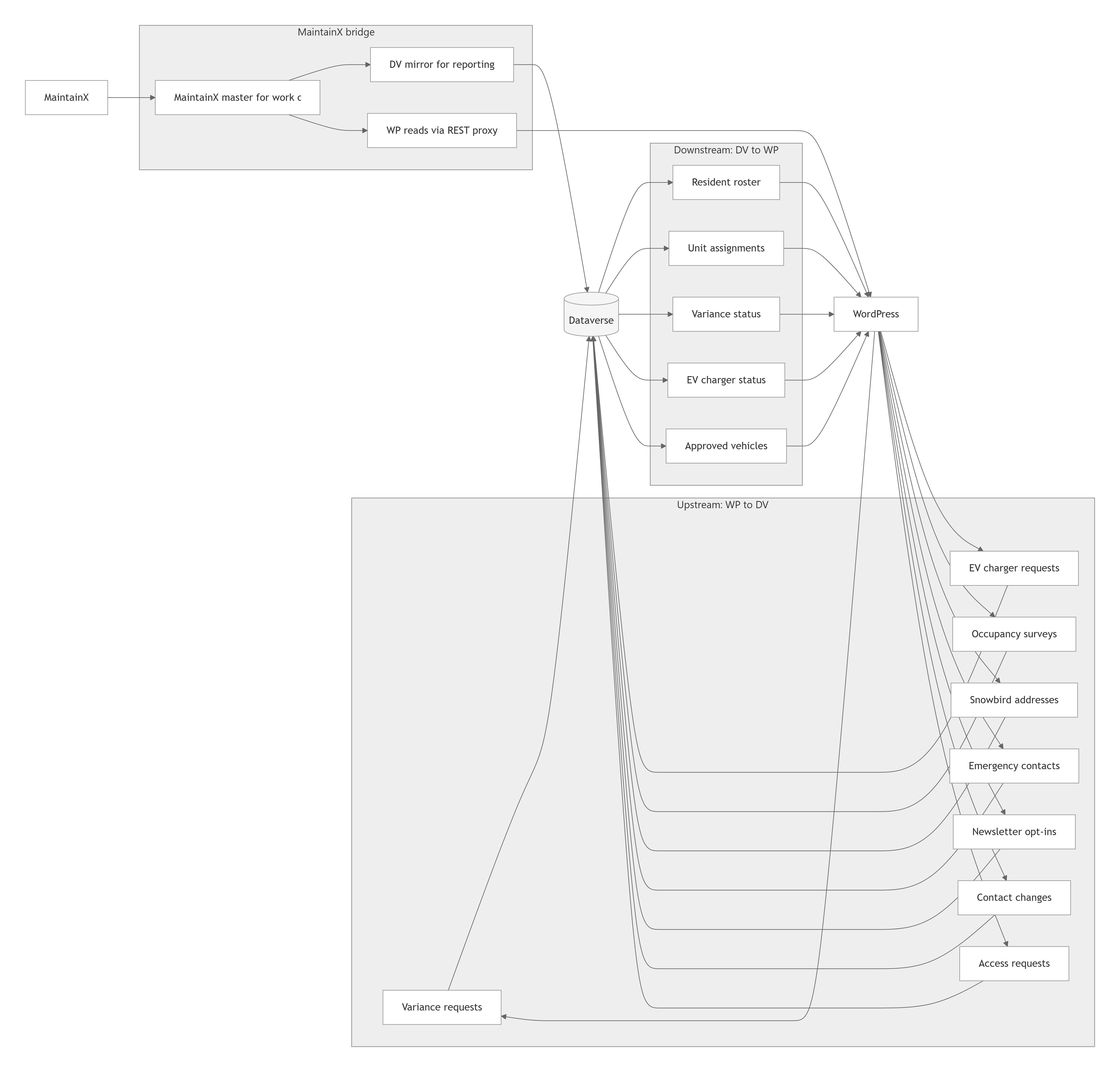
Mermaid source
flowchart LR
    subgraph Upstream [Upstream: WP to DV]
        U1[Variance requests]
        U2[EV charger requests]
        U3[Occupancy surveys]
        U4[Snowbird addresses]
        U5[Emergency contacts]
        U6[Newsletter opt-ins]
        U7[Contact changes]
        U8[Access requests]
    end

    subgraph Downstream [Downstream: DV to WP]
        D1[Resident roster]
        D2[Unit assignments]
        D3[Variance status]
        D4[EV charger status]
        D5[Approved vehicles]
    end

    subgraph Bridge [MaintainX bridge]
        B1[MaintainX master for work orders]
        B2[DV mirror for reporting]
        B3[WP reads via REST proxy]
    end

    subgraph Imports [Contact-source imports]
        A1[AUC CSV: units and owners of record]
        A2[Census MS Form: resident-confirmed contacts]
    end

    WP[WordPress]
    DV[(Dataverse)]
    MX[MaintainX]
    AUC[AUC / ADMINS]
    MSF[Microsoft Forms]

    WP --> U1 --> DV
    WP --> U2 --> DV
    WP --> U3 --> DV
    WP --> U4 --> DV
    WP --> U5 --> DV
    WP --> U6 --> DV
    WP --> U7 --> DV
    WP --> U8 --> DV

    DV --> D1 --> WP
    DV --> D2 --> WP
    DV --> D3 --> WP
    DV --> D4 --> WP
    DV --> D5 --> WP

    MX --> B1
    B1 --> B2 --> DV
    B1 --> B3 --> WP

    AUC --> A1 --> DV
    MSF --> A2 --> DV
Mermaid source
flowchart TD
    subgraph Hubs [5 canonical hubs]
        R[/residents/]
        LH[/living-here/]
        G[/governance/]
        B[/buyers/]
        C[/contact/]
    end

    subgraph CPTs [Custom Post Types]
        CPT1[announcement]
        CPT2[bulletin_pdf]
        CPT3[form_submission]
        CPT4[facility]
        CPT5[club]
        CPT6[activity]
        CPT7[board_meeting]
        CPT8[committee]
        CPT9[condo]
        CPT10[financial_doc]
        CPT11[buyer_page]
        CPT12[staff_contact]
    end

    R --> CPT1
    R --> CPT2
    R --> CPT3
    LH --> CPT4
    LH --> CPT5
    LH --> CPT6
    G --> CPT7
    G --> CPT8
    G --> CPT9
    G --> CPT10
    B --> CPT11
    C --> CPT12